
Hosting FAQs
Your Questions Answered
E-commerce FAQs
How to write product descriptions?
Bad copywriting:
“Long sleeves pullover dress. Loose fitting, contrasting split solid colors with intercepting center design.”
This is just literally describing your product.
Good copywriting:
“Subtle yet statement, simply pair this with skinny crop pants for an elevated evening look or wear it with an equally striking bottom for a stand-out look. Complete the look with sleek hair and minimal accessories and you’re good to go!”
This makes it more enticing and makes them want it.
What is the difference between building my own e-commerce website vs selling on Lazada / Shopee?
It is a simple concept which already has an answer in the physical retailing world.
Selling on those marketplace platform is the same as selling your products as consignment in a departmental store.
- You cannot reach the customers directly on your own.
- You do not know much about their preferences, taste, age group, buying patterns, commonly bought together items and etc. They are NOT your customers actually.
- You cannot create a strong brand and image.
- You will have to pay a huge commission or listing fee to the platform. Just like the departmental store will take a big cut.
- It will be hard to manage if you are selling hundreds or thousands of products.
- You cannot create your own promotions as and when you like it.
How do i make people use the promo / voucher code?
This is a common problem. Even if there is a voucher code with huge discount, people don’t really believe that it is a real deal. Here are something that you can do to your voucher code.
- Set a short validity date. Create the urgency to use it ASAP
- Print it a paper or design your email voucher code professionally
- Make it looks exclusive. Instead of “xmaspromo”, try “xmas4fans2018”
- Make your promo code less restrictive so that customers can pass it to their friends to “abuse” it
How do i increase my social media LIKEs?
In any social media, engage your fans by posting interactive questions instead of the usual boring statements. E.g. Show 2 colour pictures of the same product, ask your fans which one is nicer.
Having a Facebook page where customers can post reviews, comments and even complaints is essential to building a rapport. Over time, that rapport will turn into brand loyalty. It also inspires word of mouth, as customers/fans encourage their friends to “like” your page, and try your product/service. Try to monitor your company page for a few minutes a day and respond to customer comments within 24 hours or less. You can also sign up to receive an email alert whenever someone posts to your page.
Social proofing in now an important aspect of digital marketing. The consumers are now smarter and more savvy.
How to get more traffic to my store via search results?
Keyword Planner tool is a free keyword research tool that Google offers under their ads management portal. The tool allows you to do research to determine how many average monthly searches are conducted with certain keywords on Google. This will allow you to find out which set of keywords are popular and related to what you are offering on your eCommerce web store.

Let’s try with Google Keyword Planner that there were about 10K-100K,100 average monthly searches for the keyword “QR code scanner” as compared to “barcode scanner”. We followed this same process with other keywords and found that there were the keyword “reader” is often used as commonly as “scanner”.
So with more knowledge on the commonly keywords used, we can factor these keywords into my product NAME, DESCRIPTIONS, and search engine friendly UR (SEF URL). This will significantly your website traffic.
Web Design FAQs
What is a Mega Menu?
A mega menu is a beefed-up, advanced version of a drop down menu list. Instead of a list of text, it is a large panel which supports multiple columns of content. Besides text links, images, videos and other dynamic elements can be included. For example, an online store’s mega-menu panel can have a column that is set to automatically display the latest products added in the system.

What is a Call-to-action (CTA) and what is its purpose?
A Call-to-Action, often abbreviated as “CTA” is a button, banner or other graphic element that catches the user’s attention and entices them to take action using imperative words.
For example, a “Buy now!” button looks clickable and is brightly colored to stand out from the rest of the website. It instructs the user to take the action of purchasing the product.
Call-to-Actions are an important part of marketing as it is designed to show consumers how to take the next step and it also creates a sense of urgency. Successful CTAs provide good, compelling reasons for the customer to proceed with the purchase promptly rather than wait and consider.

What is a design mockup and why do we need it?
A design mockup is usually an image or non-functioning preview of the design for a website.
Designers use mockups to propose to you what your final website would look like before a developers start to code it. Mockups are useful in ironing out the desired look and feel of the website fairly quickly with the designer while saving time and money.
This is because changing a design mockup is relatively fast and easy. On the other hand, changing a fully built website is far more complex, time-consuming and risks introducing bugs or errors.
What is a website Frontend or Backend?
Frontend
This is the public, customer-facing side of your website.
Backend
For websites that are running on a Content Management System (CMS), this refers to the administrator side of the website which is hidden from public view. This requires login access and is secured.
What is a Wireframe?
A wireframe is a simple skeleton drawing of a website’s layout, usually with no design applied. Wireframes are used in the early stages of planning a website design to determine where content should go. By omitting the design, designers and stakeholders can focus on planning the key functions and information flow without being distracted.

What is Responsive Design?

A responsive design adapts to the device you are viewing the website on. Elements on the webpage are fluid and they resize, move, or tile depending on the size of your device screen. It also considers the web browser’s scripting capabilities and responds accordingly. A responsive website replaces the need to create and manage separate different copies of the website for different devices.
What is Typography?
Typography is the visual component of the written word. It is the style and appearance of the words. It is also an art and technique to make words readable, legible, meaningful and attractive.
A lot of people confuse typography with computer fonts. Although a font is a large part of typography, it is not the only component. Other considerations include the weight (thickness of the letters), the spacing between letters (kerning), the spacing between lines (leading), and the overall layout and arrangement of the entire text.
Typography can tell a story. Different typefaces (fonts) have history, and evoke different emotions, values and memories in people. A designer must carefully balance the aesthetics and feelings communcated by a choice of font with the functional aspects in order to achieve meaningful and effective communciation.
Bad typography has consequences – from harmless hilarity to serious, or even fatal results. Consider these scenarios:
- A mismatched choice of font for their signage makes a serious company look silly, clownish and discourage customers from patronising them.
- A logo has letters placed too closely together, making it look like a different, crude swear word when seen from a distance.
- Road signs are hard to read in poor weather conditions, causing motorists much confusion
- A medicine bottle’s label is hard to read — dangerous for the patients, especially those with poor eyesight
- Safety switches on heavy machinery are marked with a illegible font, making it hard to distinguish in an emergency
When done well, good typography is often not noticible to laymen as it is working as intended. Bad typography, however, often stands out. The next time you find something confusing or hard to read, pause and try to notice the font used.
What is white space in design?
White space, also called “negative space”, is any empty, unused space on a page that isn’t filled with content: words, images, user interface elements, buttons, etc. It is the gaps between lines of text, spacing between paragraphs, empty space around photos, and margins at the sides. It doesn’t have to be literally white – it can have any background colour or pattern.
White space is just as important as the content itself. Think about how hard it will be to read a page if all the words and pictures are crammed closely together without any gaps. Designs need white space to “breathe” and designers can manipulate white space to interesting effects.
One of the best examples of clever use of white space is the Google homepage. Unlike other websites which are usually loud and filled with information, Google chose to remove all unnecessary elements. This brings the focus onto the middle of the page, the Google logo and the search bar itself. The purpose of the page is to make you search and it does it very well.
CMS FAQS
How to change themes in WordPress?
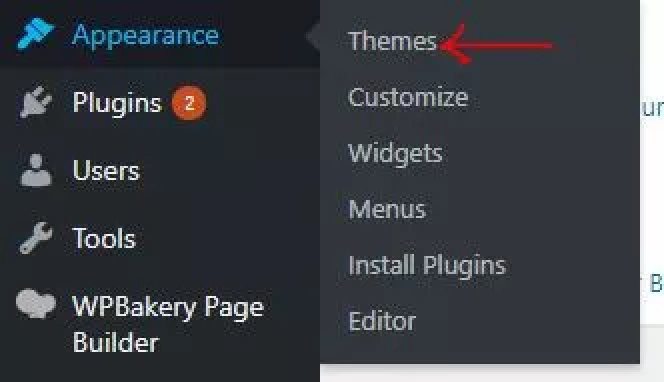
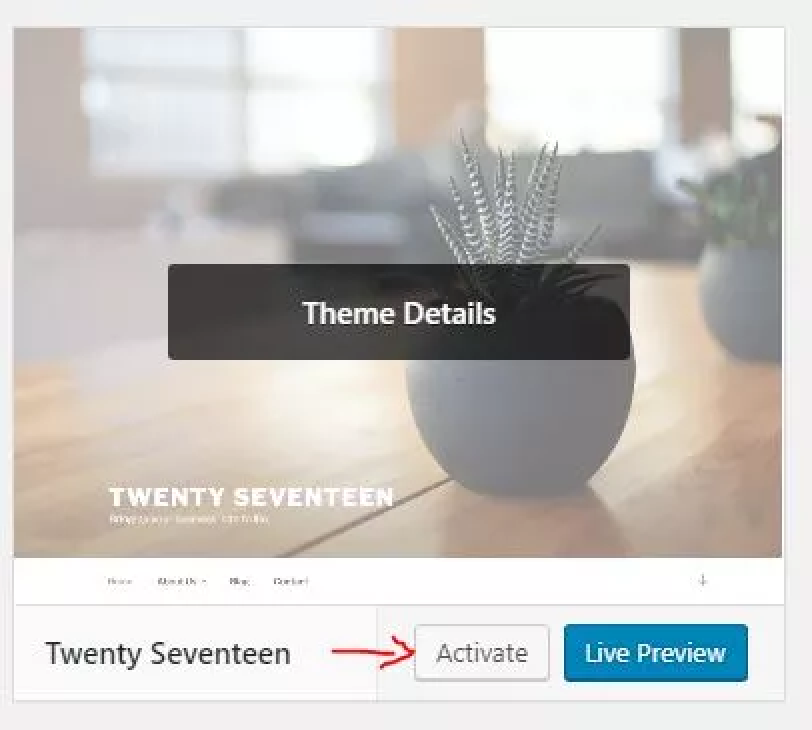
Themes can be different in terms of overall design and layout. To change theme, you need to log in to the WordPress administrator page, Hover on Appearance, click on Themes at the sidebar menu. In the Themes page, that is where you can change your theme. To change a theme, select the theme you want, then click on Activate and wait a few seconds to apply the changes. To enjoy your theme, just refresh your browser and the magic happens.
How to create a Main Menu in WordPress?
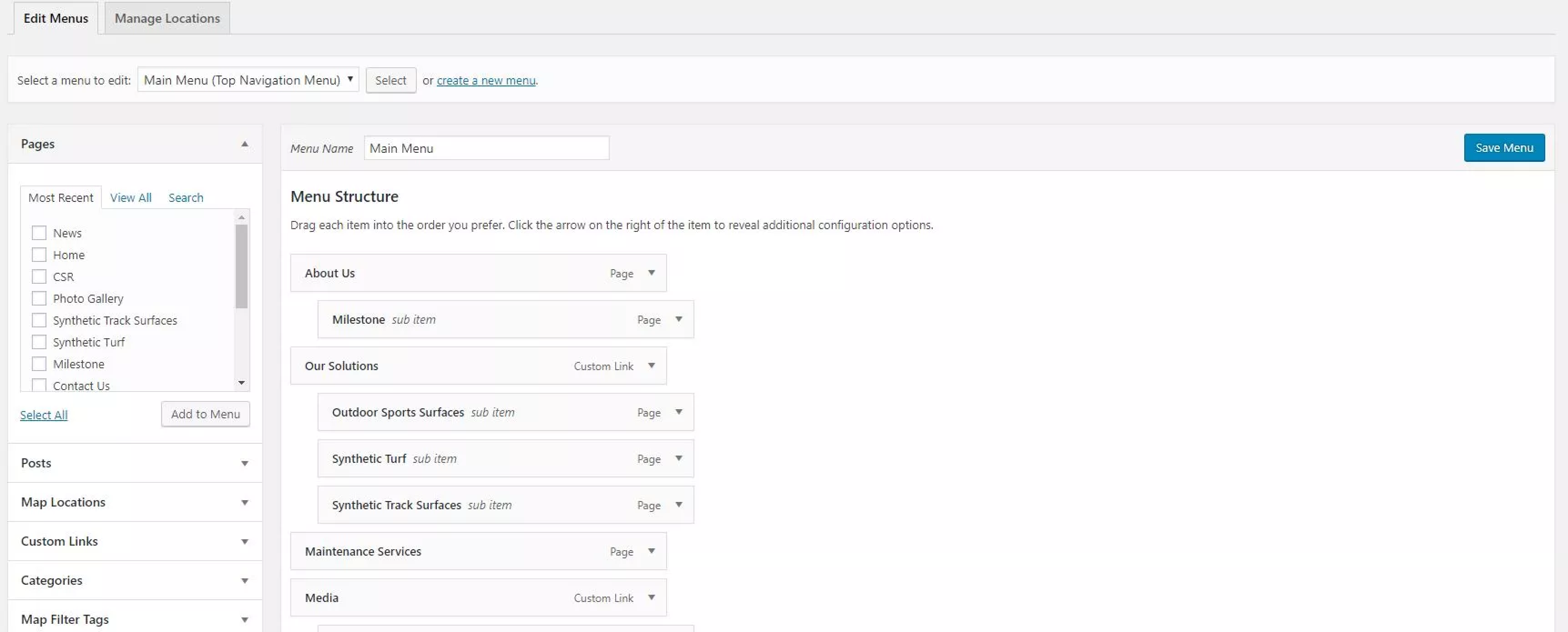
Before you create a Main Menu, log in to WordPress administrator page. After that, browse the sidebar menu, you should see Appearance. Hover on it and click on the Menu. You will be directed to Menus page. You can create menu there. Click on create a menu, type in Menu Name and click Create Menu. After you created the menu, what you need to do next is to add the menu item. It can be Pages, Posts , Map Locations, Custom Links(can be linked to external web page) and Categories. After you added the menu item, select the Top Navigation Menu as Display Location for the Main Menu. Lastly, click Save Menu. to see the Main Menu you created, refresh the browser and you will see it in the header.

How to create a WordPress page?
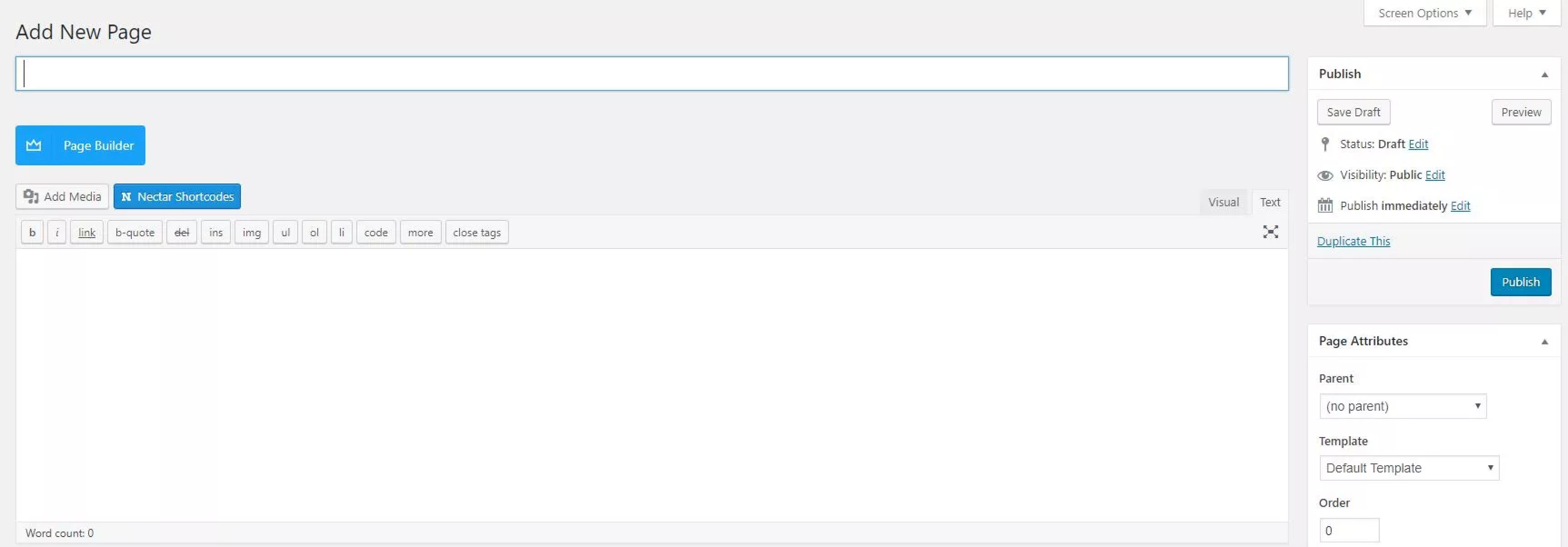
Nearly similar to Post, but Page are generally reserved for static content or information. For example, you can create About Me or Contact Us using Page. To add/create a new page, log in to the administrator page. After that Hover on Page, click on Add New. You will be taken to Add New Page page. Enter the title of the page, you can use any name but short and sweet is strongly suggested 🙂 Then you can insert your page content using page builder or normal WISIWYG editor. Page builder is easier to build a design layout comparing to WYSIWYG editor. Same with post, you can also set the Status and Date and time before you publish the post. when all things are done, click Publish.

How to create a WordPress post?
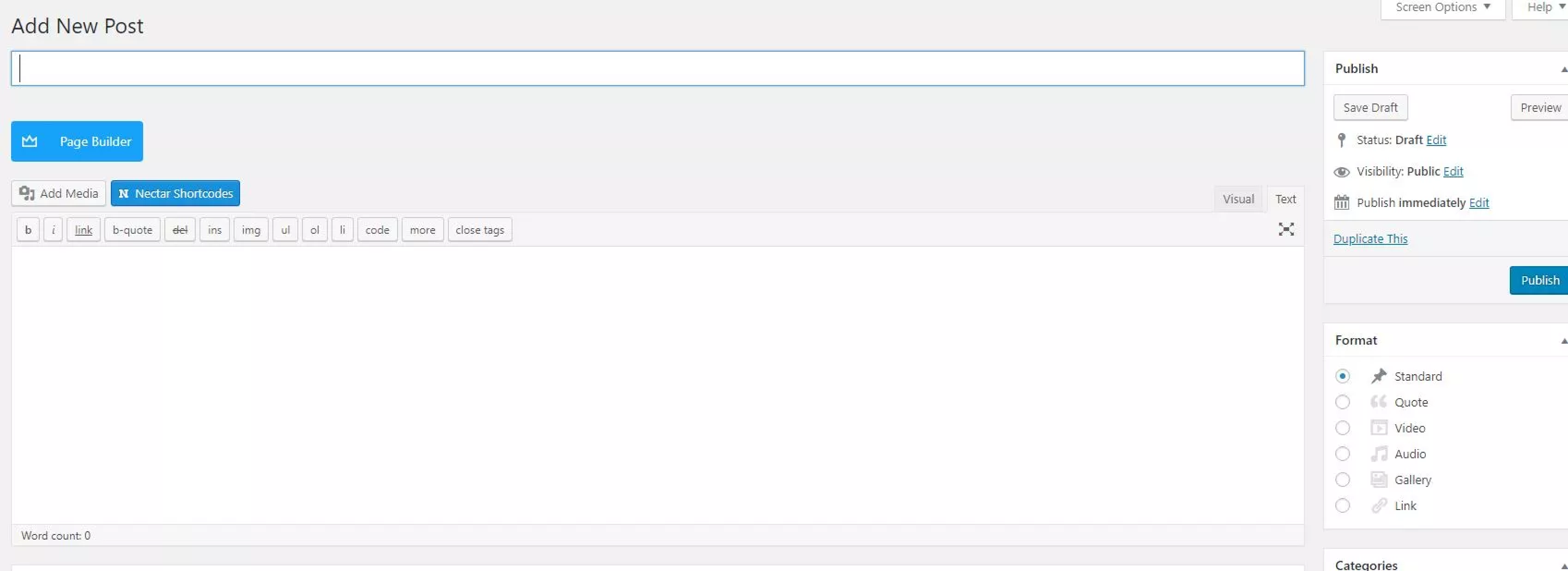
Post can be news or informational updates about a certain topic or talking point. To create a post, you need to login to the administration page. Once you have logged in, you will see a sidebar menu. Hover on Posts, click on Add New. Then in the Add New Post page, give your post a title, then you can design the layout and manage the content of the post using page builder or normal WISIWYG editor. You can set the Status to Draft before you publish it. You can also set a date and time to publish it or publish it immediately. Click Publish if you have done editing.

How to upload a media file to CMS Media Library?
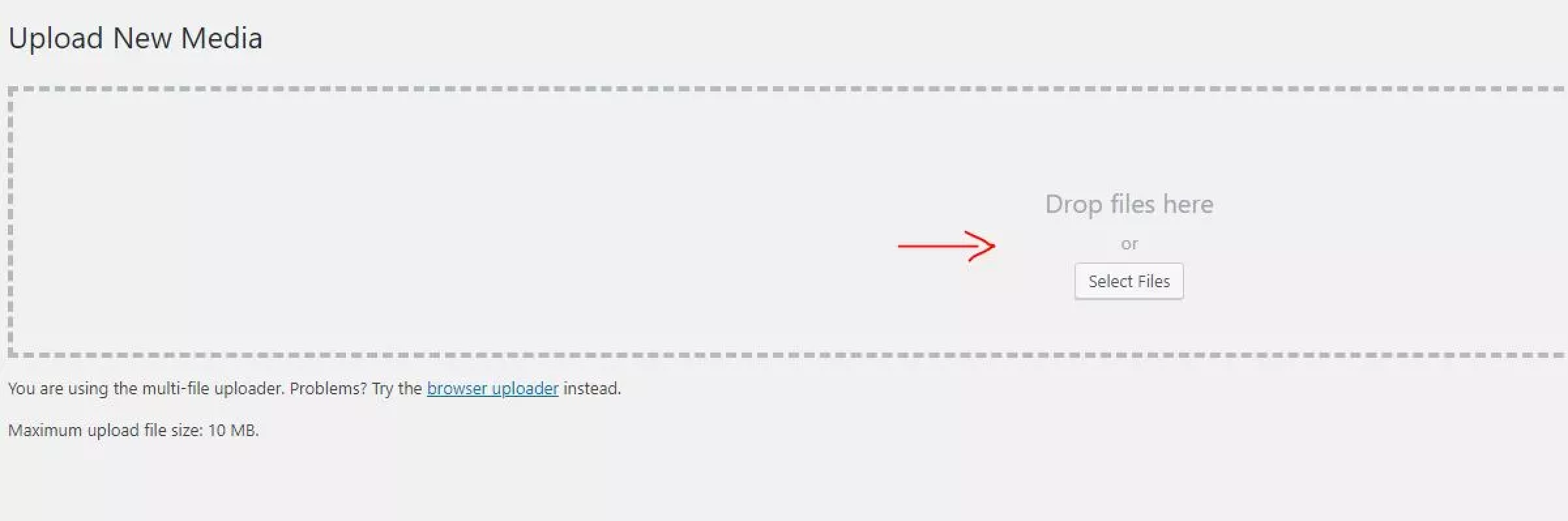
Once you login to the WordPress administration page, you will see a sidebar menu. Then on the sidebar menu, Hover on Media, click on Add New.
You will be directed to the Upload New Media page. In that page, you can upload your image file(s) by drag and drop method or by clicking Select files button. After you dropped or selected the image, the image will automatically upload to the library. In web design perpective, we recommend you save as web using a photo editing software before you upload to the CMS Media Library.
Web Hosting FAQs
What is SSL and should I have it on my website?
SSL stands for Secure Sockets Layer, SSL creates an encrypted link between a web server and a browser. It prevents customer information from being stolen. Credit card or banking numbers, name, address and other personal information will remain secure.
Whenever you need to gather personal (Contact form, login form), sensitive information an SSL certificate is a must.
Most hosting providers are giving FREE SSL (self signing) now so no more excuses of running a website that is not secured. Your SEO will also be affected if you run without SSL.
How do I know if my hosting space is full?
You should able to view your web disk space once you logged in to CPanel, To have a detailed breakdown on which folder used the most space, you can go to Disk usage / Disk space usage.
Your email and website might not work properly if your web disk is full. If you think you need to increase the web disk space. you should contact your hosting company for an upgrade by topping up the differences.
Access email account through desktop or mobile
To receive email from your laptop or mobile devices. Go to Mail, on your email account, click configure email client and follow the instruction stated on the page. The norm nowadays is to use IMAP.
How to Password protect a folder?
Password protection is useful if you need to limit public from access certain folder. It requires the user to enter username and password in order to access your site from the website.
To enable it, log in to CPanel, and select Password Protect Directories/Directory privacy select the folder you want to protect and set the credential.
How to completely backup a website in CPanel
To backup all the file, go to file manager, select the public_html folder and compress the folder, then download the compressed file.
To download database, go to phpMyAdmin, select your database and click Export.
What is a domain name?
A domain name is your unique name on the Internet. It allows your company, organisation or family to establish an Internet presence, consisting of your personalised email addresses and your own web site address. Domain names are composed of two sections – the descriptive name, and the domain suffix (e.g. .com, .net or .org). Some examples of domain names are “yourdomain.com” and “efusiontech.com”. You may register any domain name that you wish, as long as it is available. Common domain name choices reflect your full name or an abbreviation, a product or service name, or a general industry name.
What is shared web hosting?
A shared web hosting service or virtual hosting service is a form of web hosting service where more than one instance of the same is hosted on a single physical.This is generally the most economical option for hosting as many people share the overall cost of server maintenance. Shared hosting is sufficient for a corporate website. However, if you are running a high traffic ecommerce website, cloud hosting or Virtual Private Server (VPS) will be recommended.
What is dedicated host service?
A dedicated hosting service dedicated server or managed hosting service is a type of Internet hosting where the client leases an entire server not shared with anyone. This is more flexible than shared hosting, as organisations have full control over the server(s), including choice of system or hardware, etc. Server administration can usually be provided by the hosting company as an add-on service. In some cases a dedicated server can offer less overhead and a larger Return on investment Are most often housed in Data centre Colocation centre,providing redundant power sources and HVAC systems. In contrast to colocation, a dedicated hosting service provides System administration system administration and owns the server itself.
What is virtual private server?
Virtual private servers are a form of Virtualisation that split a single physical Server into multiple virtual servers. The practice of partitioning a single server so that it appears as multiple servers has long been common practice in Mainframe computers, but has seen a resurgence lately with the development of software and technologies such as VMware , Xen FreeBSD Jail User-mode Linux ,Linux-VServer,FreeVPS ,OpenVZ, and Virtuozzo. VPS hosting, in short gives you more processing power and memory without sharing with others.
What is FTP?
File Transfer Protocol (FTP) is the standard method used to transfer website files from your computer to our servers.
Why should I get a domain name?
By having a domain name enables you to advertise to the whole world at a minimum cost. Each domain name in the world must be unique – only one company can register and utilise yourdomain.com. However, there are very few restrictions on domain names – anyone may register just about any domain name they wish. As a result, more than 60,000 .com, .net and .org domain names are registered every day, effectively removing these domains from circulation. Therefore, if you don’t register your domain soon, it will be taken up by someone else.
How long does it take to register or transfer a domain name?
It will take you just a few minutes to register a domain, but it might not be available on the Internet for up to 48 hours. This is due to the fact that Internet DNS databases are updated only once a day, causing the delay.
Valid Domain Names
Domain names can only contain alphabets, numbers and dashes (i.e. hyphens or the minus signs). The underscore character, “_”, is an invalid character. SGNIC will reject applications for domain names containing invalid characters. Each field in the domain name should be less than sixty three characters long. Applications for long domain names such as very-long-domain-name-with-more-than-63-characters-in-total-for-3rd-level-only.COM.SG will be rejected.
Who “owns” the domain name?
Registrant will be the owner of a domain name (Registrant is the person or organisation whose name appears in the “WhoIs” record). Registrant will has the exclusive right to ?use? the domain name for a specified period of time. The registrant also has the control over the domain, per the terms and conditions of the Registration Agreement. The “use” of a domain name can be renewed, as long as the registrant does not violate any terms of the Registration Agreement, including but not limited to Trademark infringement.
How do I transfer files to my website?
If you are using browsers, just key in the url with a ftp:// prefix to the address bar. Alternatively, you may want to use an FTP program. Most of the hosting portal also comes with File Manager where you will get a user interface to view, download and upload files.
Administration of Website
For cPanel user, please click here to access the user guide.
Build Your Website With Us
Build Your Website With Us
Speak to Us Now.
At eFusion Technology, we develop long term relationships with all of our clients. We implement strategic planning so that as your business grows, your digital presence grows with you too. Ready to start your web journey with us?